Co-Developing an App Store App and Bare-Metal RP2350 Firmware with a Shared Swift Core and STL-Backed Digital Twin
Waiting for PCB fabrication and 3D-printed enclosures usually creates a painful bottleneck in hardware startups: firmware engineers wait for boards to arrive, while app developers build UI mockups that drift away from the physical device.
To build StackCalc—a kid-friendly, exam-legal RPN scientific and educational calculator that grows with learners from StackCalc 6 (Common Core K–6) to StackCalc 32 (AP Calculus and engineering)—we architected our software and mechanical CAD pipelines so the iOS/iPadOS/watchOS App Store app and our bare-metal Raspberry Pi RP2350 firmware share a single Swift codebase (RPNCore) and co-develop against an STL-backed Digital Twin.
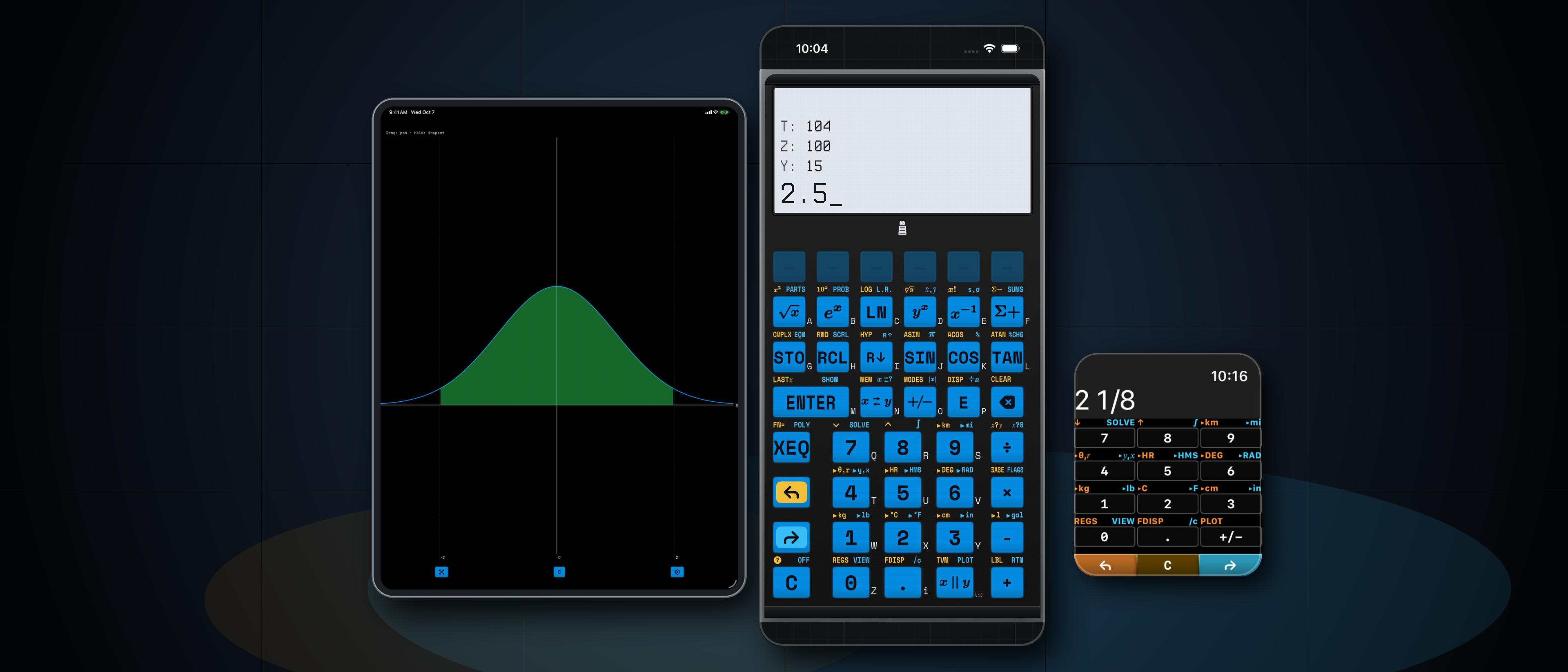
1. One Clean-Room Swift Codebase (RPNCore) Across Apple Silicon and Bare-Metal RP2350
Rather than wrapping a vintage 1980s calculator ROM dump in an emulator, we wrote RPNCore from scratch in pure, deterministic Swift with zero external framework dependencies. Because all calculator registers, program steps, statistical accumulators, and solver states live inside value-type structs without dynamic runtime reflection, the exact same Swift package compiles to:
- iOS, iPadOS & 100% Standalone watchOS (
StackCalc Calculator v1.1): - Scientific Mode (
StackCalc 32): Full 4-level RPN stack (X, Y, Z, T),LASTx, 26 lettered storage registers (A–Z), multi-variable equation solver (SOLVE), numerical Simpson integration (∫), Harmonic Mean (H.M.), Time Value of Money (TVM), Quadratic & Cubic Polynomial Root Solver (POLY), and interactive curve/scatter-plot graphing (PLOT). - Visual Learning Mode (
StackCalc 6): Focused 2-level K–6 Common Core stack with step-by-step prime fraction simplification ([SIMP]), integer division with remainder (÷R),[PRIME],[GCD],[LCM], and live dot-matrix Ten-Frames (10F), 20-Bead Rekenrek (RACK), Proportional Number Line (LINE), Geared Clock (🕒), and 5-Level Adaptive Quiz (?). - Bare-Metal Raspberry Pi RP2350 Firmware (Embedded Swift):
- Compiled for
armv8m.main-none-eabiusing Embedded Swift and linked against a thin C hardware abstraction layer (hardware_wrapper.c) that scans our 43-key tactile matrix (using active-LOW open-drain column pull-ups for RP2350 Erratum E9 immunity) and drives a \(132 \times 65\) EastRisingERC13265(ST7567) transflective LCD over 4-wire SPI.
2. Wiring OpenSCAD STLs & Laser Decals Into SwiftUI for 1:1 Co-Development
To guarantee that our firmware UX, key legends, and companion textbooks match the physical calculator down to the tenth of a millimeter before boards even leave the factory, we connected our KiCad and OpenSCAD hardware scripts directly to our Swift workspace:
flowchart LR
    KiCad["KiCad PCB (calculator.kicad_pcb)"] --> ScadGen["generate_scad.py & generate_laser_svg.py"]
    ScadGen --> STLs["Production Enclosures & dummy_pcb.stl"]
    ScadGen --> JSON["layout_data.json & layout_data_sc6.json"]
    JSON --> Replica["SwiftUI HardwareReplicaView + RetroUI (132x65)"]
Replica --> Tests["40 Hz Differential Fuzzer & Book Screenshot Generator"]- CAD-Driven Layout Registries (
layout_data.json&layout_data_sc6.json): Whenever we update switch coordinates in KiCad or keycap legends ingenerate_laser_svg.py, our build pipeline exports the exact physical button geometry, primary/shifted/alpha labels, and bezel dimensions into JSON registries consumed by Swift. - Pixel-Exact \(132 \times 65\) Framebuffer (
RetroUI.swift&LCDDisplayView.swift): Both the RP2350 firmware and the SwiftUIHardwareReplicaViewrender into the exact same \(132 \times 65\) monochrome dot-matrix bitmap coordinate space—using custom \(5 \times 7\) and \(6 \times 8\) pixel fonts so every menu bar, fraction stack, and plot curve looks identical on iPhone, iPad, Apple Watch, and physical transflective glass. - Continuous Tactile Field (
CoreHaptics): On iOS, sliding a thumb across the replica fires subtle haptic pulses when crossing physical key-seam boundaries and crisp mechanical switch transients on actuation.
3. Verifying Firmware & Textbooks at 40 Hz
Sharing a single Swift core unlocked two automated verification workflows that would be impossible on a traditional split C/Swift codebase:
1. 40 Hz Differential Grammar Fuzzer: Our cross-surface fuzz harness (Tools/fuzz_harness/) generates valid and adversarial postfix token streams (including domain boundaries like 0 ÷, singular matrices, stiffness oscillations in SOLVE, and deep fraction reductions) and executes them across both host RPNCore and the emulated RP2350 firmware loop at 40 Hz, asserting bit-for-bit register and display parity.
2. Compiling 590+ Workbook Problems Like Unit Tests (book_engine.py): Every worked example across our SC-32 Scientific Manual, SC-6 Elementary Manual, 339-Problem SC-32 Casebook, and 253-Problem SC-6 Workbook is extracted from Markdown, executed against RPNCore inside XCTest (TextbookVerificationTests_SC32.swift and TextbookVerificationTests_SC6.swift), and automatically captured as a crisp simulator screenshot.
You can try the universal app today on the Apple App Store (100% offline, zero ads, zero subscriptions) or explore our open-source STLs and hardware build logs on Hackaday.io.