Making the Four-Level Stack Visible Before the First Keypress
The difficult part of RPN is often not arithmetic. It is knowing where a value is, when the stack will lift, and what a binary operator will consume. A screen can show those facts after a keypress; the StackCalc Learning Lab asks a learner to predict them first.
A physical model of four registers
The Stack stage is a 158 × 164 mm board with four blank value tiles. Its job is deliberately narrow: make the X, Y, Z, and T registers visible while a learner rehearses ENTER, automatic lift, and a binary operation.
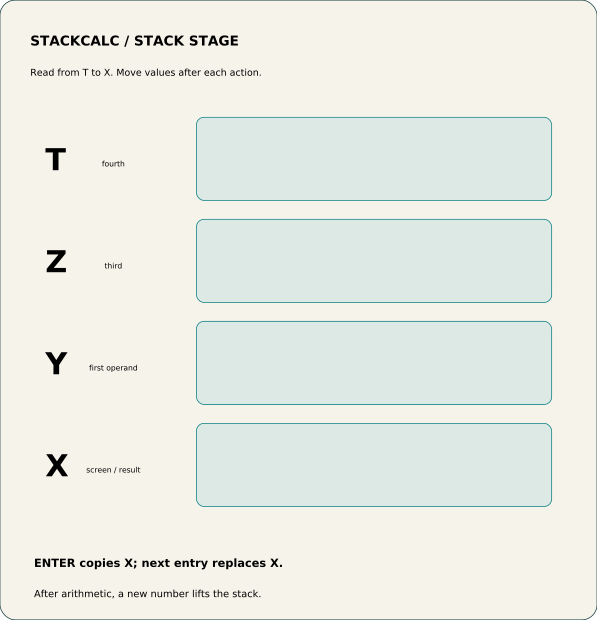
Start with a short calculation such as 3 ENTER 4 +.
- Write
3on the X tile. - Apply ENTER by copying the value into Y while retaining it in X.
- Replace X with
4; this is the entry that follows the duplicate. - Before applying
+, name the two values the operation will consume. - Replace X with
7and move the remaining tiles according to the stack rule being studied.
The board does not simulate every calculator state. It gives an instructor or self-directed learner a shared surface for discussing the state transition before software hides it behind an update.
Why the constraint helps
The blank tiles force the explanation to be about state, not decoration. A learner can change the numbers, make a wrong prediction, and repair it without treating a printed diagram as a fixed answer. The same sequence can then be keyed into StackCalc on the watch or phone.
This is a prototype teaching aid. It has not yet been evaluated with learners or educators, and the final marking, material, and classroom durability need physical validation.
Turn a display convention into a table exercise
The Stack Stage has four labeled positions—X, Y, Z, and T—because “the stack moves” is too abstract for a first lesson. Put a value in X. Press ENTER and duplicate it into Y. Place a new value in X. Before pressing an operation, ask which two positions will be consumed and which value will become the new X. The learner predicts the state before the calculator confirms it.
The board is a printable companion rather than a replacement for the calculator. Its physical tiles make the transition slow enough to discuss; the app and firmware path then repeat the same sequence at normal calculator speed. That is why the labels match the vocabulary used by the RPN core rather than inventing a separate classroom notation.
The board and cards are included in the public Learning Lab STL and PDF release. A simple first activity is 3 ENTER 4 +; a better second activity is to start with two values already placed and ask students to reconstruct the entry sequence that produced them. That moves the lesson from memorising keypresses to explaining calculator state.
Use mistakes as the activity material
The most useful prompts are not “what is the answer?” but “what did the stack contain just before the answer?” Give a learner a plausible wrong tile arrangement, then ask which earlier keypress caused it. That keeps the activity grounded in prediction, correction, and explanation—the same habits that make RPN practical after the tiles are put away.
Set up a repeatable first session
Use one operation family per round. In the first round, learners build an addition sequence and explain why X and Y are the operands. In the next, leave the tiles in a deliberately incorrect arrangement and ask them to identify the keypress that caused the error. The point is that an instructor can see and discuss the state transition in the moment. The same card sequence can then be repeated on the app, so the physical activity and calculator behavior reinforce one vocabulary.